Knowledge base › Suppliers and imports
Clean up messy supplier values
Suppliers send Blk, NAVY BLUE or ACME LTD. Fix them once and every later file follows, because the rules belong to the supplier.
This is on a paid plan, on the column mapping screen of an import.
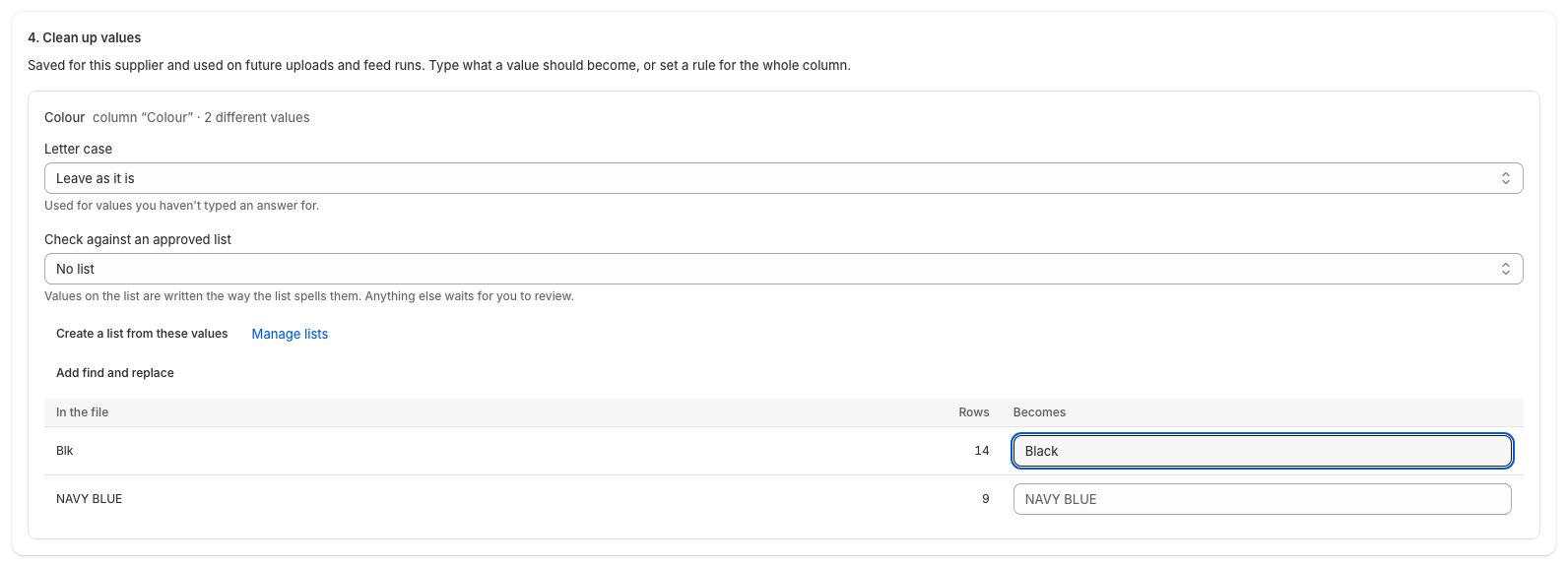
- During an import, find the Clean up values step. Catalyn lists the distinct values for each field you have mapped (brand, product type, colour, size, material and more) with how many rows use each.
- In the Becomes box beside a value, type the value you want. In the picture,
BlkbecomesBlackandNAVY BLUEis left as it is. - For the whole column you can also:
- set a Letter case, which applies to values you haven't typed an answer for;
- Check against an approved list, so values on the list are written the way the list spells them and anything else waits for your review (Create a list from these values makes one for you);
- Add find and replace to change text inside values.
- The preview shows the result as you type, before anything is imported.
- Check and preview, then import. The rules are saved with the supplier, so scheduled feeds and later uploads apply them too.
Related
Still stuck, or something here is out of date? Email [email protected].