Knowledge base › Suppliers and imports
Let suppliers send files to you
Give each supplier a private link so they can send you their price list without logging in or emailing it.
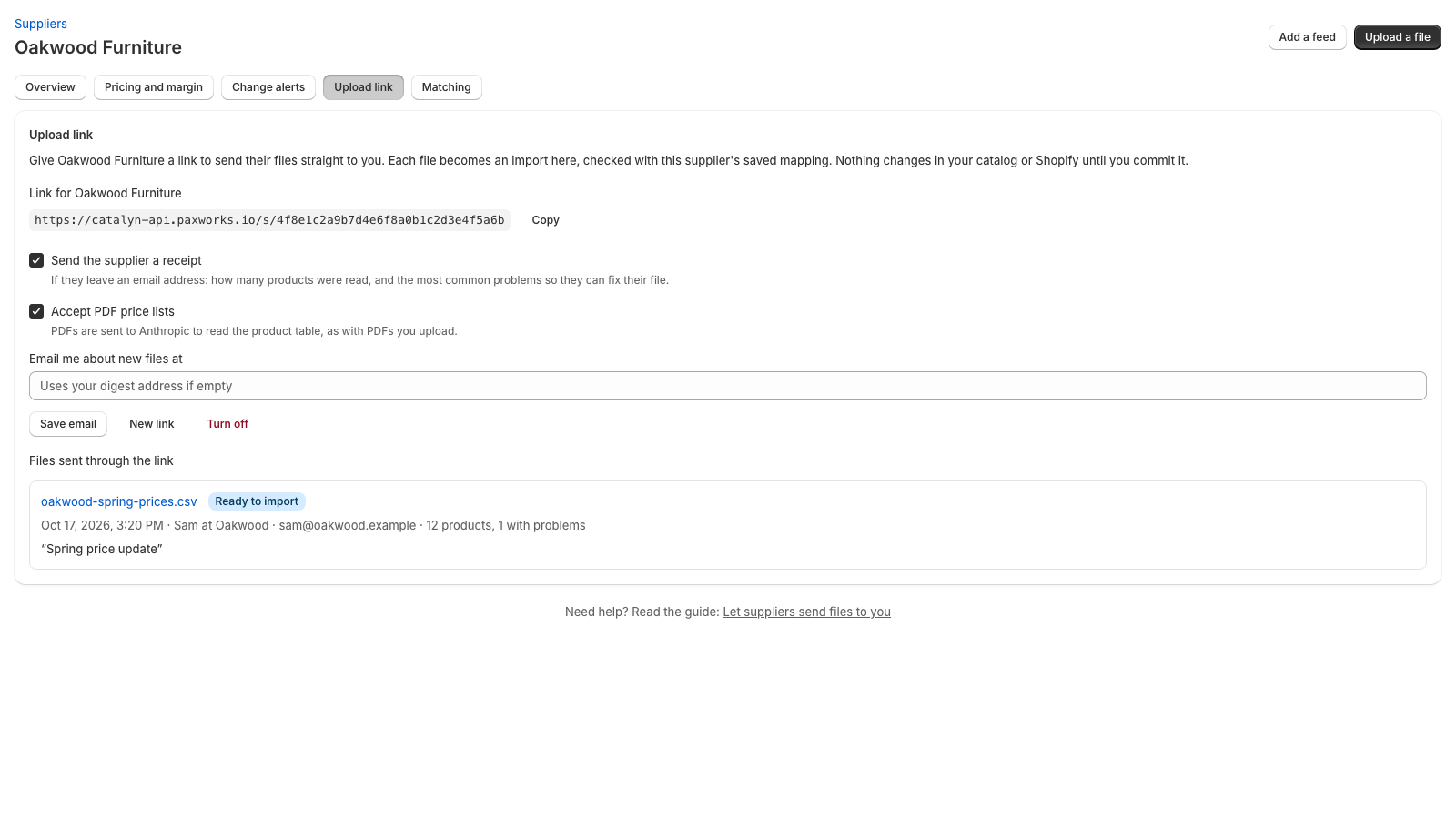
- Go to Suppliers, open the supplier, then the Upload link tab.
- Select Create upload link, then Copy and send the link to the supplier.
- The supplier opens the page and drops their file. It runs through the mapping you already confirmed and waits for you to review it. Nothing changes in your catalog or Shopify until you import it.
- Files sent through the link appear at the bottom of the tab, with who sent them, their note, how many products were read and how many have problems. Select a file to open its import.
Options
- Send the supplier a receipt: if they leave an email address, they get how many products were read and the most common problems, so they can fix their file.
- Accept PDF price lists: PDFs are sent to Anthropic to read the product table, as with PDFs you upload.
- Email me about new files at: uses your digest address if left empty. Select Save email after changing it.
Stop access
- Turn off disables the link.
- New link creates a fresh address. The old link stops working at once, so send the new one to the supplier.
Files are limited in size and each link has a daily limit. Only the supplier's file and an optional name, email and note are collected.
Related
Still stuck, or something here is out of date? Email [email protected].