Knowledge base › Suppliers and imports
Fix a problem with an import or feed
Most problems with an import come from the supplier's file, and Catalyn tells you what it found before anything is imported. This guide shows where to look and how to fix the common ones. Nothing is published to your store without your approval, and every approved update can be undone.
Read the preview first
Open an import. The cards at the top show how many products are new, updated, unchanged and Rejected. Below them, red and amber banners explain any problems found in the file, and the list at the bottom shows the reason against each product.
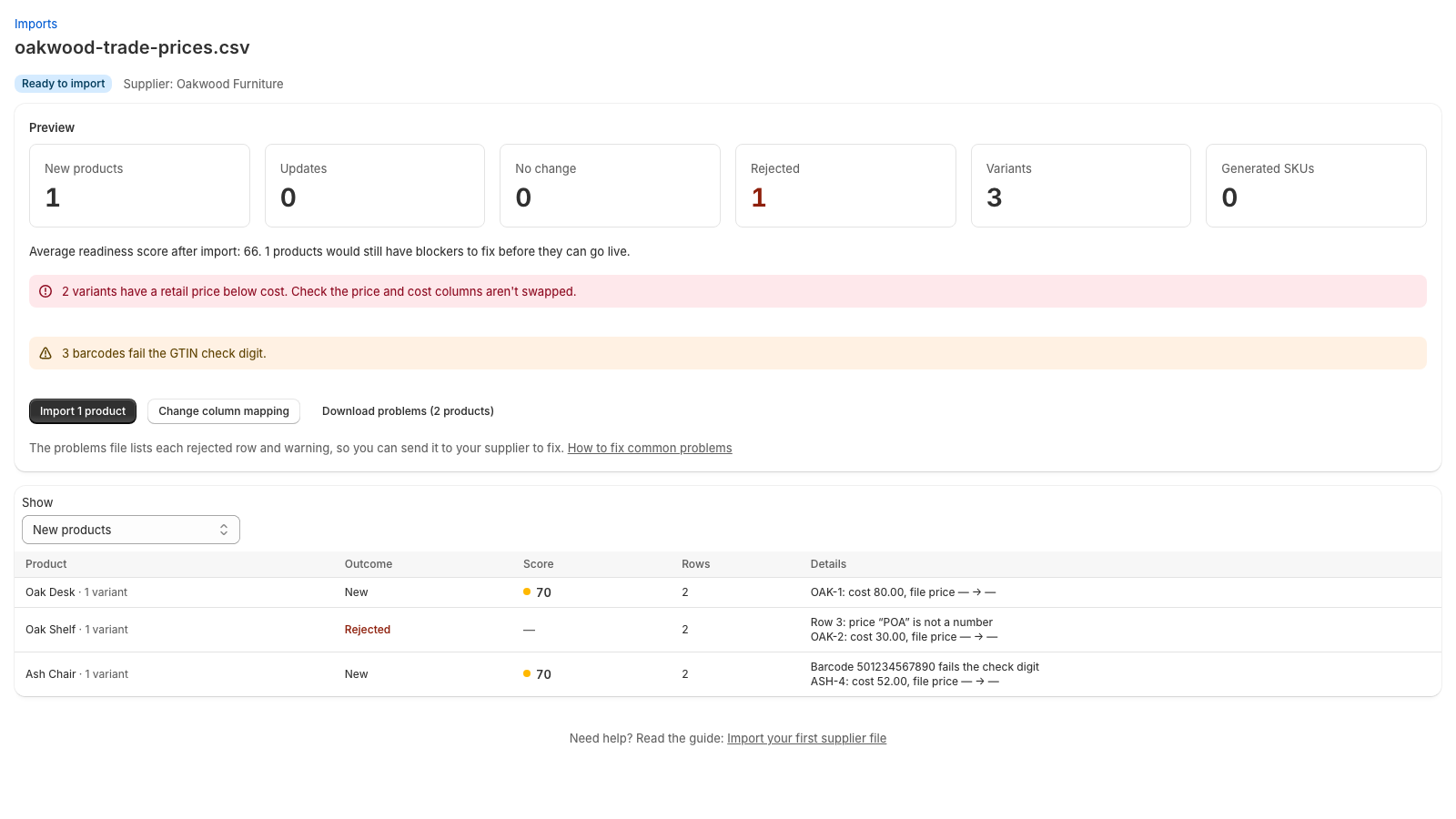
- A red banner is serious. Check it before you import.
- An amber banner is worth a look, but doesn't stop you.
- A Rejected row can't be imported, and its reason is in the Details column.
- Download problems gives you a file listing every rejected row and warning, with the row number. Send it to your supplier so they can fix their file.
Common messages and what to do
| What you see | What it means | What to do |
|---|---|---|
| Rejected row: a price is not a number | A price cell holds text such as "POA" | Fix the cell in the file, or ask the supplier, then upload again. |
| "Variants have a retail price below cost" | The price and cost columns may be swapped | On Change column mapping, check which column is price and which is cost. |
| "Barcodes fail the GTIN check digit" | A barcode has a typo | Correct it in the file. Products with a bad barcode are flagged for Google. |
| "Stock equals … on most rows" | The stock column may really be a pack or carton quantity | Check the stock column in the mapping. |
| "Every row is out of stock" or "the newest date is over a year ago" | This may be an old or partial file | Ask the supplier for the current file. |
| "Of this supplier's products aren't in this file" | The file may not be their full range | If it should be, ask the supplier. Catalyn flags missing products and never deletes them. |
| Import blocked: currency | The file's currency differs from your store's | Catalyn never converts prices without telling you. Confirm the supplier's currency on the mapping screen, or convert the file's prices there. |
| Import blocked: product limit | Your plan's product limit is reached | Upgrade your plan, or import fewer products. Nothing is deleted if you downgrade. |
| Rows missing after an import | A row filter, a blank key column or a duplicate row | Check the supplier's row filters and the problems file. |
Wrong values such as Blk or NAVY BLUE | No clean-up rules for that supplier | See Clean up messy supplier values. |
| A row matches more than one product | Two products share a SKU | See Match rows to your products. |
| Prices below your margin, or cost rises | Alerts working as intended | See Understand supplier alerts and scorecards. |
When a feed pauses
A feed pauses itself instead of applying a file it isn't sure about. Open the feed to see why.

The usual reasons:
- The file's columns changed. The supplier renamed or moved columns. Select Review the import, check the new column mapping, and confirm it. The feed then carries on with the new mapping.
- The file is much smaller than before. It may be a partial file, so a feed holds it for you. Open the import and check it, or ask the supplier.
- A serious warning, such as prices below cost or costs rising past your alert threshold with pausing turned on.
- New products use values that aren't on your approved lists. See Use approved value lists.
- The server's identity changed on an SFTP feed. Confirm with the supplier that they moved servers, then select Accept the server's new identity. Never accept it without asking.
- The feed is over your plan's limits. Change the feed or your plan.
To carry on, select Switch back on, or Skip this file and switch back on if you don't want to apply the file that caused the pause.
When a feed can't reach the file
Open the feed and select Test connection. It tells you what is wrong, such as a rejected login, an address that can't be found, a path with no matching file, or a changed server key, and it downloads nothing. See Connect a supplier feed.
Other things people ask
- Images not showing, or "supplier image links that don't load". The supplier's image address has changed, or their site blocks Catalyn. Ask for new links, or upload the photos under Media, Upload and match. See Manage your images.
- "Changed directly in Shopify". Someone edited the product in Shopify. Choose Keep to accept it or Restore to put Catalyn's version back. See Approve and undo an update.
- An update is stuck waiting for approval. Approvals may be limited to named approvers. The store owner sets them under Settings, Team and email. See Team, approvals and email.
- "Needs a paid plan". You are on the free plan, or a subscription has lapsed. Open Settings, Plan.
- AI allowance used up. Allowances reset each month. See Plans and billing.
Still stuck? Email [email protected] with your store address, the page, the exact message and the import's file name. We can find it from that.
Related
Still stuck, or something here is out of date? Email [email protected].